Generic types (classes)#
A generic type in Python is a class, that inherits the typing.Generic class.
It can be used to define arbitrary type parameters, which can be given a value using a subscription operator [].
Arbitrary types / type variables can be created using the typing.TypeVar class.
Note
Since Python 3.12, the typing.TypeVar no longer requires manual definition
and can be omitted.
 1from typing import Generic, TypeVar
 2
 3
 4T = TypeVar('T')  # From Python 3.12 forward this is optional
 5
 6class MyClass(Generic[T]):
 7    def __init__(self, a: int, b: T):
 8        ...
 9
10
11my_instance1: MyClass[float] = MyClass(5, 5.5)
12my_instance2: MyClass[str] = MyClass(5, "Some text")
13my_instance3: MyClass[int] = MyClass(5, 0)
In the above example, the T is a type variable. It is also a type parameter inside MyClass.
When instances are created, the variables are annotated with a type subscription (e. g., MyClass[int]).
While Python itself doesn’t care about the types given in the subscription, and just ignores incorrect types,
TkClassWizard resolves these subscripted types into the __init__ function of a class, allowing the definition
of arbitrary types with the use of type generics.
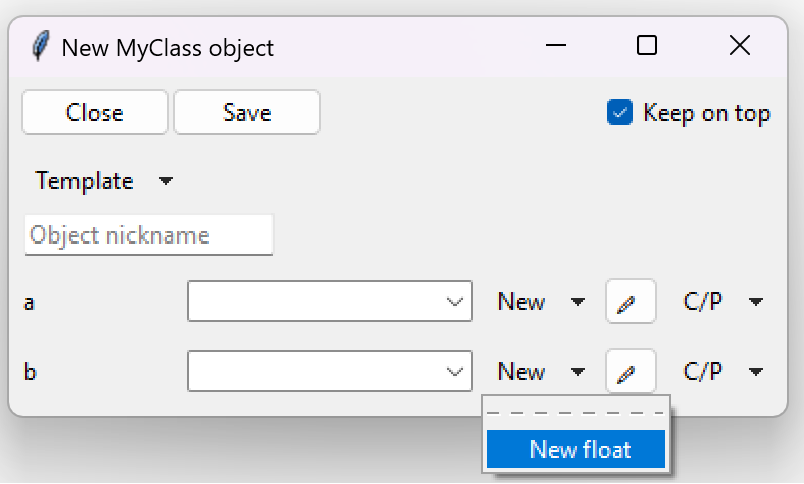
If we take the above example and pop it into TkClassWizard with MyClass having a float annotation,
we would get the following types in the New <type> options:
 1from typing import Generic, TypeVar
 2
 3import tkclasswiz as wiz
 4import tkinter as tk
 5import tkinter.ttk as ttk
 6
 7T = TypeVar('T')  # From Python 3.12 forward this is optional
 8
 9class MyClass(Generic[T]):
10    def __init__(self, a: int, b: T):
11        ...
12
13root = tk.Tk("Test")
14
15combo = wiz.ComboBoxObjects(root)
16combo.pack(fill=tk.X, padx=5)
17
18def open():
19    window = wiz.ObjectEditWindow()  # The object definition window / wizard
20    window.open_object_edit_frame(
21        MyClass[float],
22        combo
23    )  # Open the actual frame
24
25ttk.Button(text="Define", command=open).pack()
26root.mainloop()